Translate instructions
Your own language
This website is written in the Dutch language.
We understand that it would be easier to use and comprehend the content on this website in another, preferrable your own, language.
Simply use our integrated readspeaker tool or use the translate-function of your internet browser to translate the text on a page. We will show you how to do that.
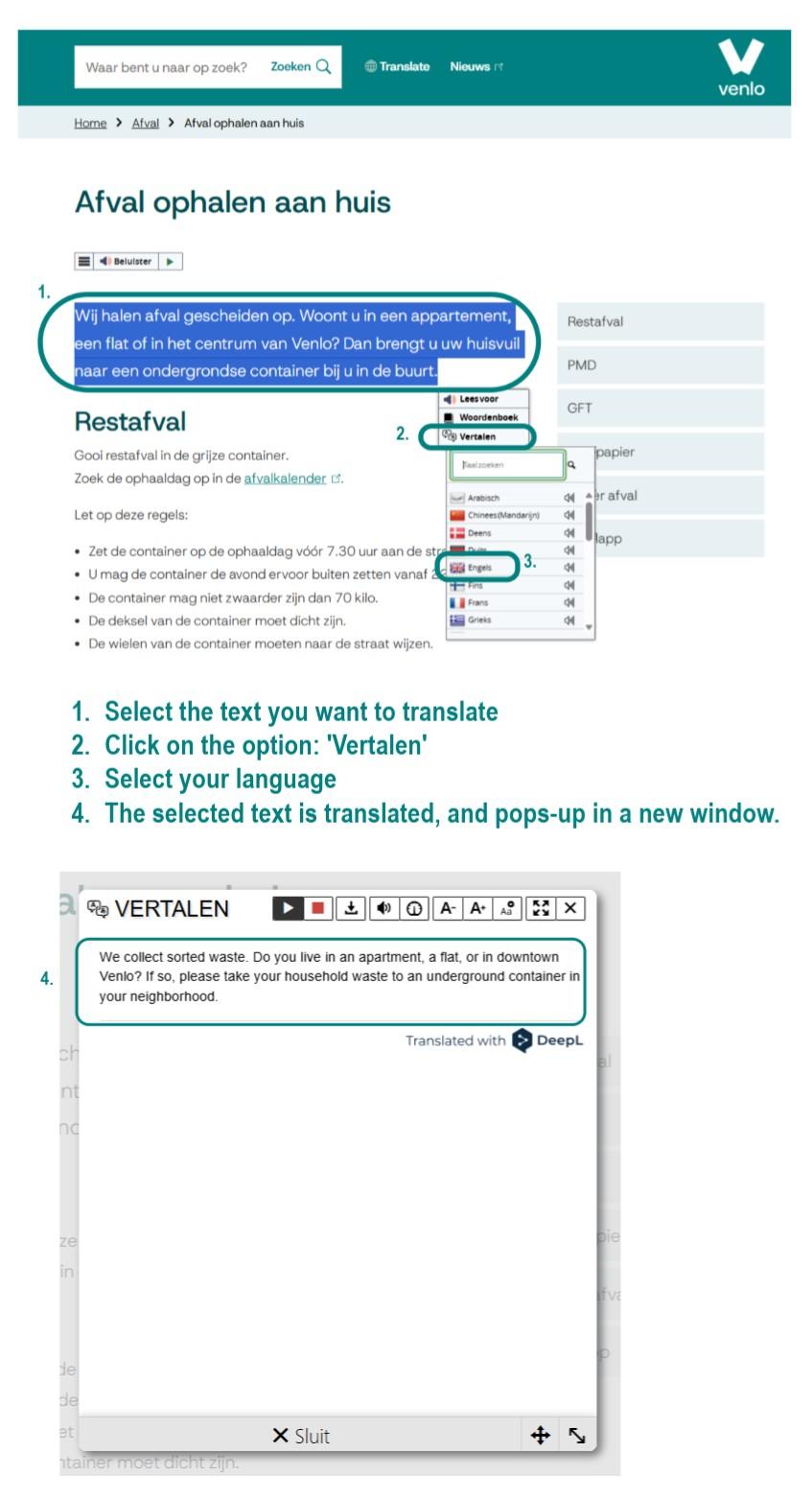
Options
-
The image (above) shows you step-by-step what you need to do:
- Select the text you want to translate
- Click on the option: 'Vertalen'
- Select your language
- The selected text is translated in a new window.
-
Browser
Simply use your internetbrowser on desktop or phone to translate this website.
For example, you can do this with:- Edge (Microsoft)
- Safari (Apple)
- Firefox (Mozilla; version 118 and onward)
- Chrome (Google)
3 examples for translating this website using your own browser
Example 1: Use Google Chrome's translation function
- You will find the translation function in the pull-down menu (click on the 3 dots at the top of the screen on the right).
- Choose ‘translate’ ('vertalen'). The entire website will automatically translate into your preferred language.
Example 2: using Google Translate with Google Chrome
- In the 'Settings' ('Instellingen') of Google Chrome, select your preferred language under 'Languages' ('Talen'). You can find the settings in the pull-down menu (click on the 3 dots at the top of the screen on the right).
- In Google Chrome's ‘Settings’ check the ‘Languages’-box to translate with Google Translate.
- If you then view a webpage in a language other than your preferred language, a pop-up will appear with a proposal to translate the webpage.
- If you click on this, the whole webpage will be automatically translated into your preferred language.
Example 3: using Google Translate
- Go to translate.google.com
- Copy the link (the URL) of this website in the left textbox
- A new link will appear in the right textbox.
- If you click on the link in the right textbox, the translated website will show
Disclaimer automatic translationThe official content of this website is in Dutch. If you use the automatic translation of your internetbrowser, parts of texts may not be translated correctly. This is due to the limitations of the translation software. If in doubt, please contact us.
Nederlands
-
Nederlandse uitleg
Deze website is in het Nederlands geschreven. We begrijpen dat het soms fijner is om deze website in een andere taal te lezen. U kunt hiervoor heel makkelijk de vertaalfunctie van uw internetbrowser gebruiken.
U kunt uw internetbrowser gebruiken om deze website zelf te vertalen naar een andere (uw eigen) taal. Dit kan bijvoorbeeld in de browsers:- Edge (van Microsoft),
- Safari (van Apple),
- Firefox (van Mozilla; vanaf versie 118)
- Chrome (van Google).
Meestal staat het vertaalpictogram in het zoekveld of in de werkbalk bovenin. Of u kunt de vertaalfunctie van uw browser vinden onder ‘Instellingen’. Soms toont de browser een pop-up met de vraag of de pagina vertaald moet worden.
Hieronder vindt u 3 voorbeelden van vertalen met Google:
Voorbeeld 1: vertaalfunctie van Google Chrome gebruiken
- U vindt de vertaalfunctie in het hamburgermenu (de 3 puntjes rechtsboven in beeld).
- Klikt u op ‘vertalen’, dan wordt heel de website automatisch vertaald naar uw voorkeurstaal.
Voorbeeld 2: Google Translate gebruiken via Google Chrome
- In de ‘Instellingen’ van Google Chrome kunt u onder ‘Talen’ uw voorkeurstaal instellen. U vindt de instellingen in het hamburgermenu (de 3 puntjes rechtsboven in beeld).
- In de ‘Instellingen’ van Google Chrome kunt u onder ‘Talen’ óók aanvinken om te vertalen met Google Translate.
- Als u daarna een webpagina bekijkt in een andere taal dan uw voorkeurstaal, dan verschijnt er een pop-up met voorstel op de webpagina te vertalen.
- Klikt u hier op, dan wordt heel de website automatisch vertaald naar uw voorkeurstaal.
Voorbeeld 3: vertaalfunctie van Google Translate gebruiken
- Ga naar translate.google.com(Verwijst naar een externe website)
- Kopieer de link van deze website (de URL) in het linker tekstvak
- In het rechter tekstvak verschijnt een nieuwe link.
- Klikt u op de link in het rechter tekstvak dan krijgt u de vertaalde website te zien.
Disclaimer automatische vertaling
De officiële tekst van deze website is Nederlands. Als u gebruik maakt van een automatische vertaling via uw internetbrowser, dan worden delen van teksten mogelijk niet correct vertaald vanwege de beperkingen van de vertaalsoftware. Neem bij twijfel contact met ons op.